Click Brother Script: A Bold Font for Business
As a small business owner, I know how much visual details matter. From the first glance at a product label to the final scroll on a website, every element shapes how customers perceive your brand. Recently, I was tasked with updating a bakery’s packaging and realized that the right font could make all the difference. That’s when I discovered Click Brother Script.
A Font That Speaks With Confidence
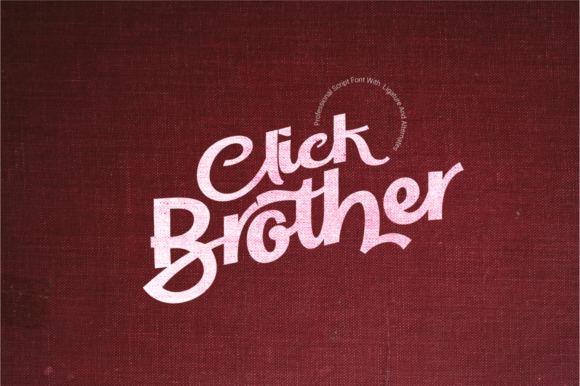
Click Brother Script is more than just a typeface—it’s a personality. It blends sophistication with boldness, offering a handwritten feel that feels authentic and approachable. Whether you're designing a logo or adding a touch of flair to a menu, this script font has the charm to stand out without overwhelming the eye.
The font’s character is warm and expressive, making it ideal for brands that want to convey creativity, trust, and individuality. Its strokes are fluid yet structured, giving it a refined edge that works well in both digital and print formats.
Real-World Applications for Small Businesses
I tested Click Brother Script on several projects, starting with a candle seller looking to refresh their jar labels. The font added a personal touch that made the products feel more handmade and unique. It worked especially well for product names and taglines, where a bit of flair can elevate the overall presentation.
Another project involved a café updating their menu. Using Click Brother Script for headings and special offers gave the menu a fresh, modern look while maintaining readability. It paired beautifully with a clean sans serif font for body text, creating a balanced and professional design.
For an online shop, I used the font on social media graphics and banners. The result was a cohesive brand identity that felt polished and consistent across different platforms. It helped reinforce the brand’s message without being too flashy or distracting.
When to Use Click Brother Script
This font shines as a display typeface. It’s perfect for headlines, logos, and short phrases where visual impact matters. However, it’s not ideal for long blocks of text due to its intricate details, which can reduce readability at smaller sizes.
For small labels, mobile screens, or printed packaging, it’s best to use the font sparingly. Pairing it with a simpler typeface—like a modern sans serif or elegant serif—can help maintain clarity while still keeping the design engaging.
It also works well as a decorative accent. For example, using it for a boutique’s product tags or a handmade item’s description adds a custom feel without overwhelming the viewer.
Design Tips for Maximum Impact
When working with Click Brother Script, consider the context. If you’re designing for a skincare brand, use the font for product names or key benefits. For a coaching business, it can add a personal touch to landing pages or promotional materials.
Always test the font at different sizes and on various backgrounds. On a dark background, it stands out more, while on light surfaces, it can feel softer and more inviting. This flexibility makes it a versatile choice for many creative projects.
Another tip is to explore the font’s alternate characters and ligatures. These subtle variations can add depth and uniqueness to your designs, making them feel more crafted and intentional.
Why It Matters for Branding
Typography plays a huge role in how customers perceive a brand. A well-chosen font can make a business look more professional, trustworthy, and memorable. Click Brother Script helps achieve that by adding a human touch to digital and physical materials.
Consistency is key in branding. By using a single, cohesive font across all touchpoints—whether it’s a website banner, a thank-you card, or a product package—you create a stronger brand presence. This consistency builds recognition and loyalty over time.
For small businesses, even small design choices can have a big impact. Click Brother Script is a great example of how a premium font can transform a brand’s visual identity without requiring a massive investment.